






Description
The AI Prompt Generator (Task Prompt) tool on soloBizOS.com is a solution designed to help users create optimized and in-depth prompts for popular AI models such as ChatGPT, Claude, Gemini, Grok, and DeepSeek.
This tool completely eliminates complex prompt drafting steps, ensuring that the AI returns accurate results that are on-target and closely aligned with business or personal needs.
ARTICLE CONTENTS
+ Key Interface Components.
+ Results & Multi-Platform Integration.
+ Core Benefits
+ How to show list of task prompts in soloBizOS.com?
+ How to create a prompt to command AI to perform any tasks?
DETAILED CONTENT
1. Key Interface Components
The interface is optimally designed with intuitive input fields (like Illustration 02 bellows):
Task (Number 12): Where you enter the main request or task to be performed (e.g., Analyze the spa industry market in Tokyo).
Content objectives (Number 14): Define the specific objective of the content.
Tone (Number 16): Choose the voice or tone (e.g., Informal, Professional, etc.).
Target audience (Number 17): Clearly specify the customer or reader profile.
Length (Number 18): Select the length of the output content.
CTA desires (Number 19): State the call to action clearly (e.g., register, purchase, leave information).
Language (Number 20): Choose the output language.
Prompt Generate Button (Number 21): Activate the automated prompt-drafting system.
2. Results & Multi-Platform Integration
Once the system processes the input, you will receive a complete Prompt (section Number 11) divided into clear sections such as the AI's role, input information, and output requirements.
Copy Prompt Button (Number 23): Quickly copy the prompt to the clipboard.
Quick Integration (Numbers 25 - 30): Forward the prompt directly to AI platforms such as ChatGPT, Gemini, Grok, or DeepSeek.
3. Core Benefits
Time-saving: Automates the prompt engineering process in just a few seconds.
Workflow standardization: Keeps AI outputs consistent, professional, and on-brand.
Versatile and user-friendly: Suitable for both beginners and advanced users without requiring in-depth AI prompt engineering experience.
4. How to show list of task prompts in soloBizOS.com?
To do it, you click on AI Prompt Generator (1) menu => Then you click on Task Prompt (2) sub-menu => Then you can see list of task prompts like Illustration 01 bellows.
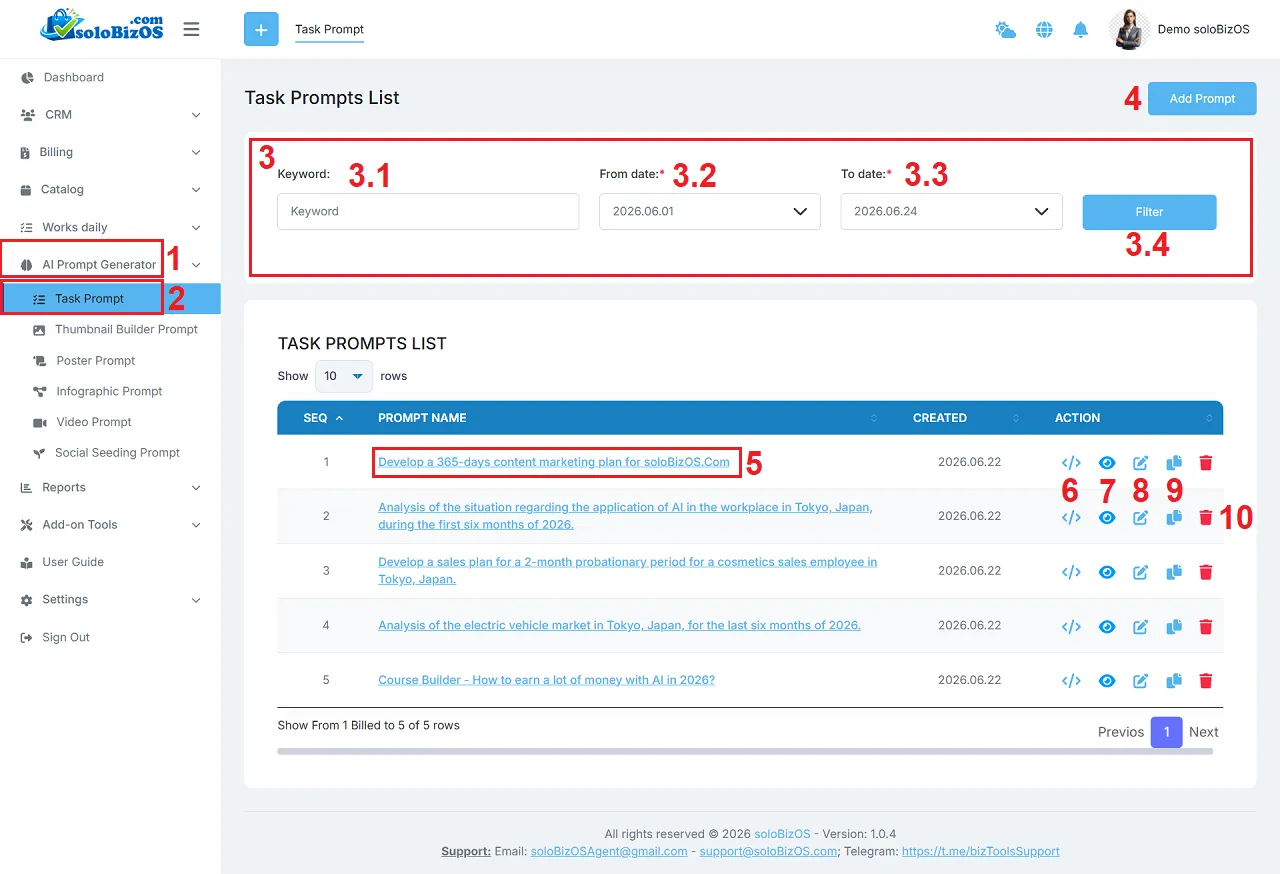
Illustration 01: List of Task Prompts
* Explain:+ 3rd area: It's used to filter data of list of thumbnail prompts.
+ Add prompt (4) button: You click on this button to create a new thumbnail prompt.
+ Thumbnail Prompt Name (5) and Eye Icon (7): You click on this to show the thumbnail prompt details.
+ Code Icon (6): You click on this icon to get its prompt.
+ Pencil icon (8): You click on this icon to modify its prompt.
+ Duplicate Icon (9): You click on this icon to duplicate that prompt.
+ Trash icon (10): You click on this icon to delete its prompt.
5. How to create a prompt to command AI to perform any tasks?
To do it, in list of task prompts like Illustration 01 above, you click on Add Prompt (3) button => In Task Prompt form like Illustration 02 bellows, you need input or choose the suitable values for all box => Then, you click on Prompt Generate (21) button to create the task prompt.
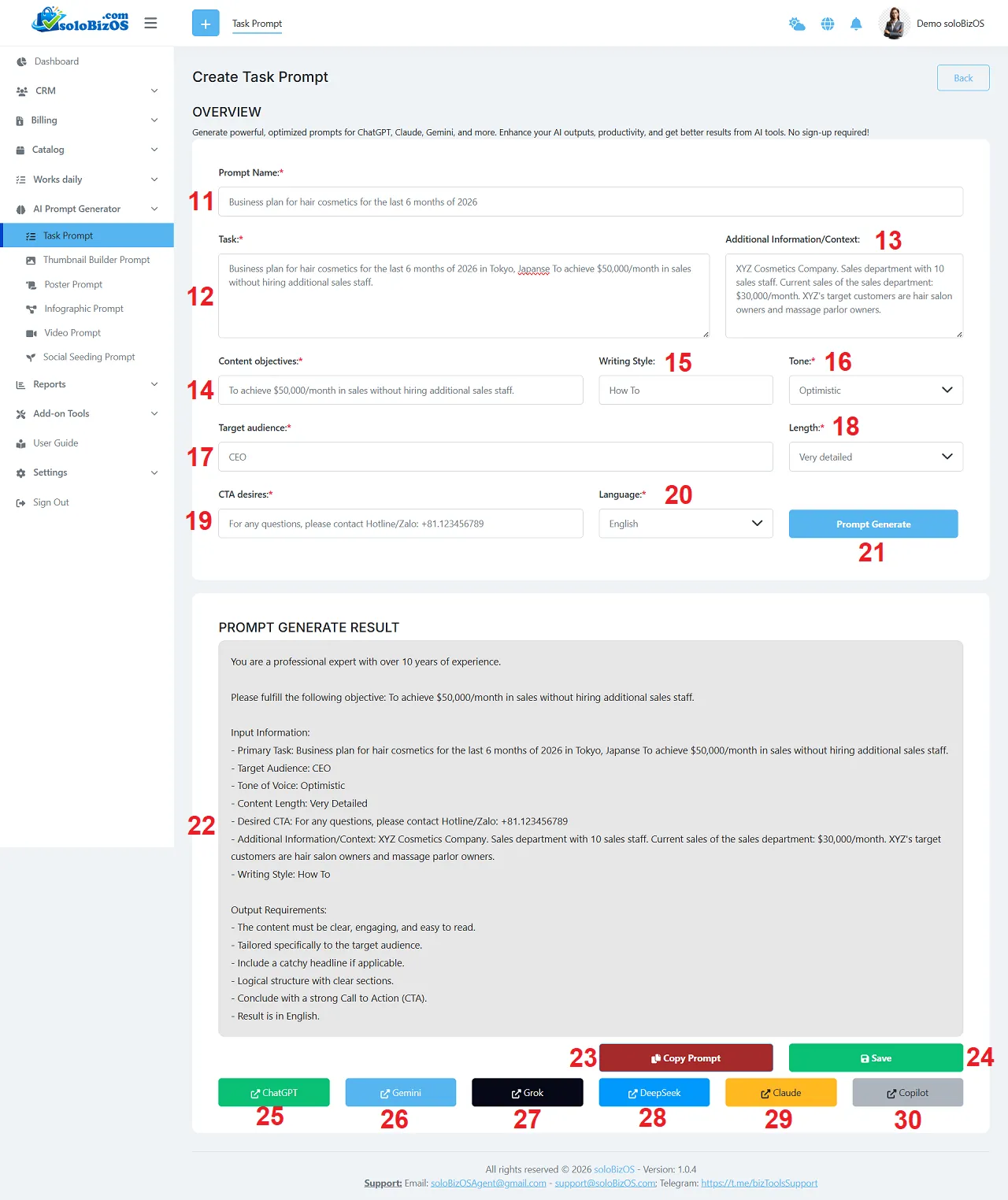
Illustration 02: Create a new task prompt
6. Notes
+ Tone (16): You need the suitable tone that AI's writing content with that tone.
+ Language (20): You need choose the suitable result language that AI's writing content with that language.
*For any questions, please contact us via Email: soloBizOSAgent@gmail.com Or support@soloBizOS.com Or Contact us via Form CONTACT for a prompt response.