






Description
(soloBizOS) - Running a solo business means wearing multiple hats every day. You're the CEO, marketer, customer support representative, accountant, and product manager all at once. With so many responsibilities, important ideas, customer information, and business tasks can easily get lost if they aren't documented properly.
Effective note management isn't just about writing things down. It's about creating a system that helps you capture information, organize it, retrieve it quickly, and turn it into action.
In this guide, you'll learn practical strategies for managing notes efficiently so your solo business can stay organized, productive, and ready to grow.
1. Why Note Management Matters for Solo Businesses?
Unlike larger companies with dedicated teams, solo entrepreneurs rely heavily on their own memory and organization. Poor note management often leads to:
- Forgotten client requests
- Missed business opportunities
- Duplicate work
- Lost ideas
- Slower decision-making
- Reduced productivity
A well-organized note system becomes your second brain, allowing you to focus on growing your business instead of trying to remember everything.
2. What Types of Notes Should You Keep?
Successful solo entrepreneurs usually maintain several categories of notes.
2.1. Business Ideas
Inspiration can appear anywhere. Record:
- Product ideas
- Service improvements
- Marketing campaigns
- New business opportunities
Never rely on memory alone.
2.2. Meeting Notes
Whether you're speaking with clients, suppliers, or partners, document:
- Key decisions
- Requirements
- Deadlines
- Action items
- Follow-up tasks
Meeting notes prevent misunderstandings and improve professionalism.
2.3. Customer Information
Keep notes about:
- Customer preferences
- Frequently asked questions
- Previous conversations
- Pain points
- Special requests
Better customer knowledge leads to better service.
2.4. Standard Operating Procedures (SOPs)
As your business grows, documenting repetitive processes saves enormous amounts of time.
Examples include:
- Publishing blog posts
- Responding to customer inquiries
- Social media workflows
- Sales processes
- Invoice creation
2.5. Personal Learning
Document lessons learned from:
- Books
- Podcasts
- Courses
- Webinars
- Industry research
Building a personal knowledge base helps you continuously improve your business.
3. Best Practices for Managing Notes
3.1. Capture Information Immediately
Don't wait until later.
If an idea appears while driving, walking, or talking with a client, record it immediately before it disappears.
Speed matters.
3.2. Keep Notes Organized
Avoid dumping everything into one giant notebook.
Instead, organize notes into logical categories such as:
- Clients
- Marketing
- Finance
- Content
- Projects
- Operations
- Personal development
A structured system saves countless hours later.
3.3. Use Consistent Naming
Develop a simple naming convention.
Examples:
- Client - John Smith
- Marketing - Facebook Ads
- Blog - SEO Checklist
- Meeting - Weekly Review
Consistent titles make searching much easier.
3.4. Link Related Information
Many business notes are connected.
For example:
- Customer notes
- Project notes
- Task lists
- Meeting summaries
Connecting related information creates context and improves decision-making.
3.5. Review Notes Regularly
Creating notes isn't enough.
Schedule time weekly to:
- Archive outdated information
- Update ongoing projects
- Complete action items
- Review business ideas
Regular reviews transform notes into progress.
4. Common Mistakes to Avoid
Many entrepreneurs unknowingly make these mistakes:
4.1. Depending on Memory
Your brain is for thinking not storing information.
Write everything important down.
4.2. Using Too Many Note Apps
Scattering notes across multiple platforms creates confusion.
Whenever possible, centralize your information in one organized system.
4.3. Writing Without Structure
Random paragraphs become difficult to revisit later.
Instead, use:
- Headings
- Bullet points
- Checklists
- Tags
- Categories
Structure improves readability.
4.4. Never Reviewing Notes
Notes that are never revisited have little value.
Create a routine for reviewing and updating your information.
5. Benefits of an Effective Note Management System
When your notes are organized, you gain several advantages:
- Faster decision-making
- Better customer service
- Improved productivity
- Reduced stress
- Easier project management
- Stronger knowledge retention
- Better business planning
- More consistent execution
Instead of searching for information, you'll spend more time creating value.
6. How to Build a Simple Note Workflow?
A practical workflow looks like this:
- Capture every important idea immediately.
- Organize notes into categories.
- Add relevant tags or keywords.
- Link related notes together.
- Review notes weekly.
- Archive outdated information.
- Convert actionable notes into tasks.
Following this routine creates a reliable knowledge management system that grows with your business.
7. Guide to Managing Notes with soloBizOS.com
7.1. How to show list of notes in soloBizOS.com?
Todo it, you need click on Works Daily (1) menu => next you click on Notes (2) sub-menu => then you can see list of notes like Illustration 01 bellows:
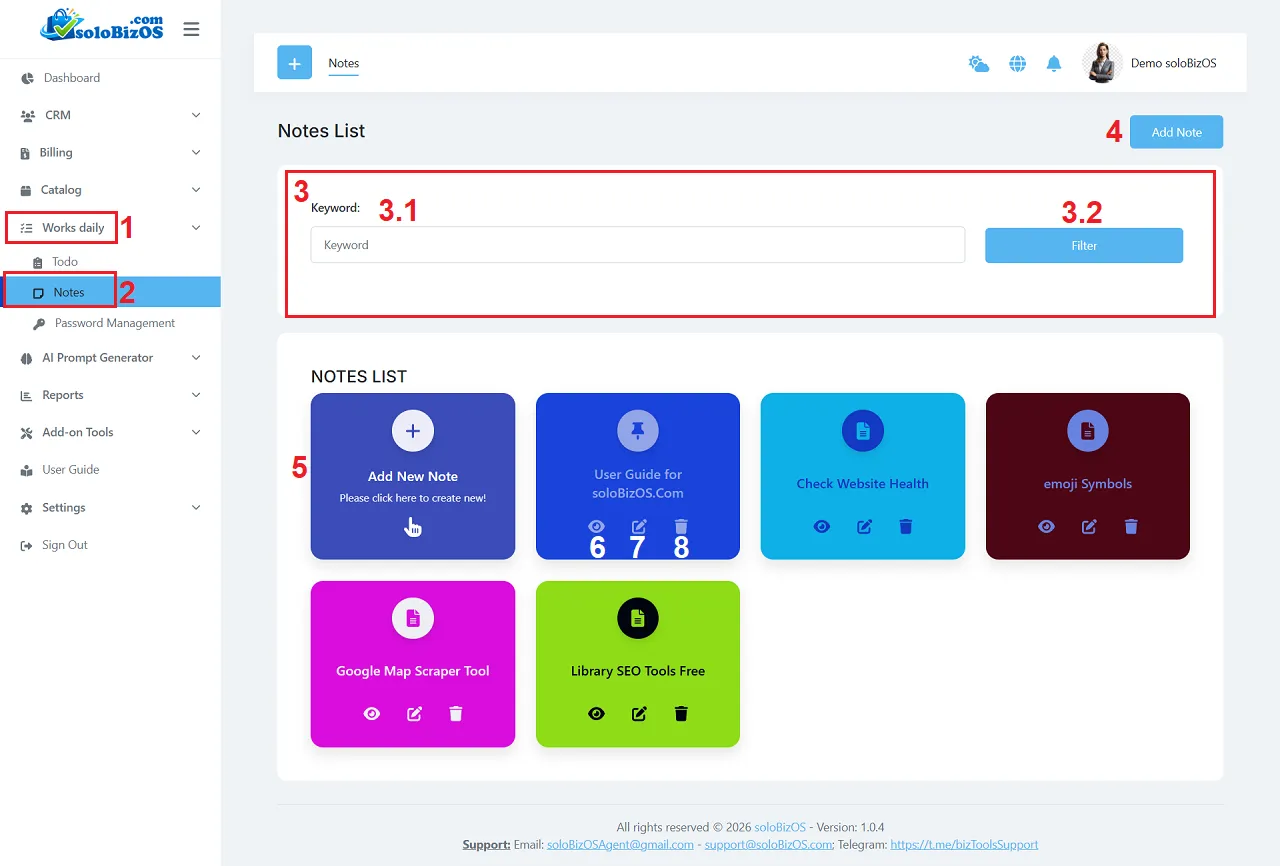
Illustration 01: List of Notes
* Explanation:+ 3rd Area: It's used to filter data about notes.
+ Add Note (4) button or Add New Note (5) box: You click on this button to create a new Note.
+ Eye icon (6): You click on this to show Note details.
+ Pencil icon (7): You click on this icon to modify that Note.
+ Trush icon (8): You click on this icon to delete that Note.
7.2. How to create a new Note in soloBizOS.com?
In Notes List like Illustration 01 above, you click on Add Note (4) button (or Add New Note (5) box) => In Note Create form like Illustration 02 bellows, you need input all things for that form => Final, you click on SAVE (15) button to finish.
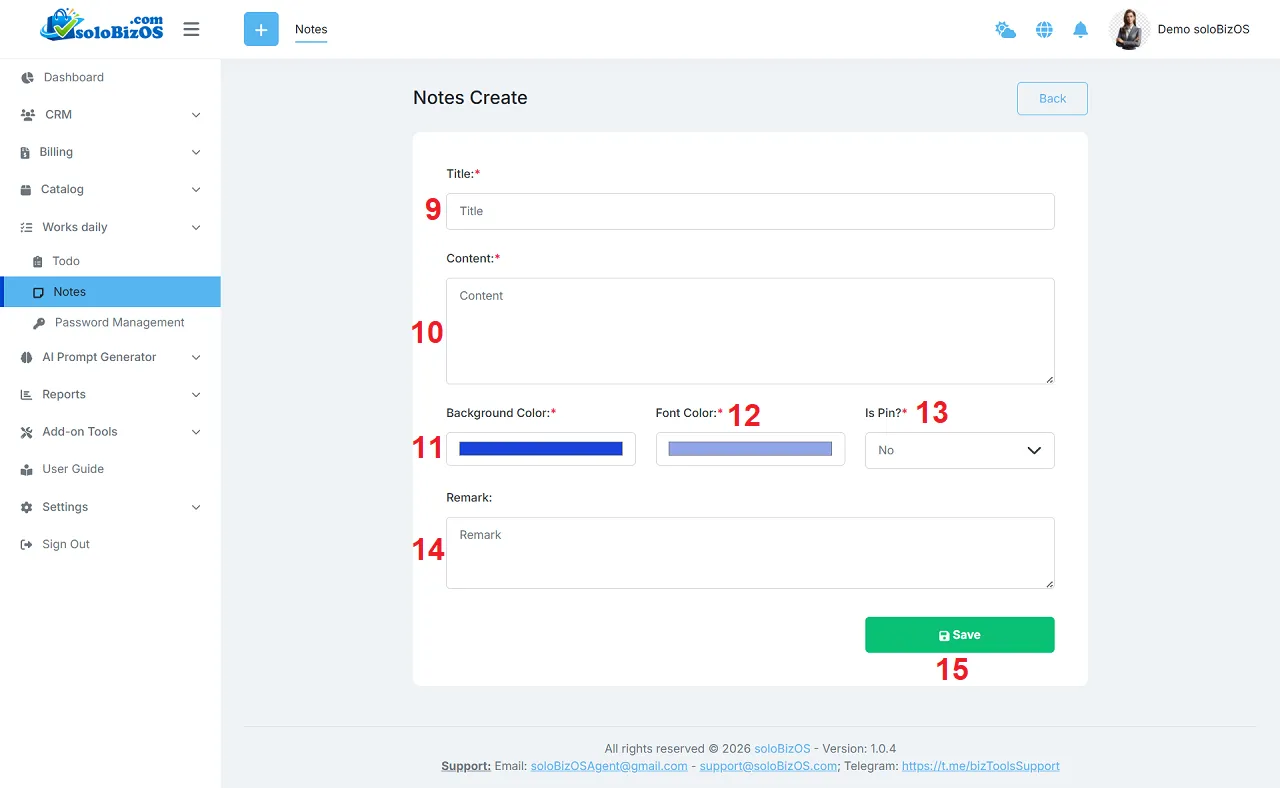
Illustration 02: Create a new note
* Notes:+ Is Pin? (13) box: Yes - That note is displayed at the top of the Notes list.
Final Thoughts
Managing notes effectively is one of the most valuable habits a solo entrepreneur can develop. A reliable note management system helps you remember important details, organize knowledge, make smarter decisions, and work more efficiently every day.
Rather than relying on memory, build a structured process for capturing, organizing, and reviewing information. Over time, your notes become a powerful business asset that supports growth, improves consistency, and helps you focus on what matters most serving customers and expanding your business.
*For any questions, please contact us via Email: soloBizOSAgent@gmail.com Or support@soloBizOS.com Or Contact us via Form CONTACT for a prompt response.